Saturday, September 14, 2024

Tools & courses to help teaching

SW Learning tools:

Coding (own projects)

trinket.io   Full program projects. Mostly python; Also HTML, Java; Pygame also supported

  • trinket.io https://www.similarweb.com/website/trinket.io/competitors/
  • https://www.online-python.com/  beta
  • https://onecompiler.com/python  multiple lang little start up help
  • https://pythonsandbox.com/

replit.com Full programs

Turtle graphics is a good place to start.

pygame - students wanting more switch on their own to this.

https://www.similarweb.com/website/copyassignment.com/#overview

Teaching Websites (guided learning only)

w3schools.com  Paths to learn many languages, try code snippets, get certified or use for language ref.

https://uk.pcmag.com/education/73124/the-best-programs-for-learning-to-code

Python4me - Starts easy and covers basics, plus important interfaces, like SQL

HW Learning tools:

Arduino

123d.circuits.io


Monday, June 6, 2022

Robot Dancing = Basic Movements in Patterns

Our dancers are the robots! 

However having students "play" robot can help them understand how to program their robots.

Dances are just combination of repeated patterns. 

  • Some dances are simple To-and-Fro. 
  • Some dancers move around the dance floor. 
  • Some dancers like square dance mirror each others moves.

Dancing alone

To-and-Fro = Basic Opposite movements

  • forward-backwards
  • left-right turns
    • including circles = 360 degree turn (and back)
  • angular movements - there and back
Create your own dances = movement pattern
  • repeat a combination of moves
    • may be opposites 
    • must not be all opposites
  • moving around dance floor
    • Add extra step at end of pattern to (slightly) change direction like:
      • to and fro movements are not same in length
      • extra turn
      • extra partial circular turn
    • How could you do a waltz?
    • If "modern" dance, do all robots need to make the same moves?
      • if don't make same move, what problems could arise?

Dancing together

Now need to keep space between each other.
Dancers should start at same time.Or with specific timing between starts.

Line Dances

  • Robots start in a line facing forward doing same moves
    • To-and-Fro
    • All doing same pattern dance

Square Dances:

  • Robots face each other
  • Robots in circle
    • Facing out
    • Facing in (more precision needed)
 Pattern Dances:
  • dance partners start together as defined by the dance pattern
  • program so dancers stay together during dance

Mirroring moves = Keeping partners together

Goal : Partners must end up at same place after each dance move:
  • If no program change .
    • Enough space for both robots can go forward toward each other.
    • Enough space for turns
  • If Program opposite/ mirroring moves
    • One goes forward and partner goes backwards
    • One goes left and partner goes right
    • Angular - to-and-from
      • How would you mirror in program?

Dancing together Dancer Start positions

This summarizes the dancer start positions of all dances independent of dance type.
  • in a line facing forward
  • in a line  in a follow-the-leader line-up
  • in a circle facing forward
  • in a circle  in a follow-the-leader line-up
  • some where on dance floor with enough room to make dance moves
Videos Coming!

Tuesday, May 31, 2022

Robots K-2 Story oriented

K-2 Story-oriented arts and robots

Overview 

Goal: To excite K-2 about STEAM through fun activities, that let them associate learning with creativity and imagination.

Why Story-oriented? This age is rich in imagination, so good to connect robots with a story or puzzle. Whatever the robot does is part of a general story as a character or an object or lesson goal. Ex.s: Go to bridge on mat, Go to answer, Simple math or spelling, maze, etc.

Simple robots make a good introduction to following a sequence of commands = programming to solve a problem or present a solution. This is good as an introduction even for older students.

A=Arts in STEAM

  • decorate the robot and surroundings to go with their story 
  • via crafts, Legos, attachments or even 3D printed parts
  • have to the robot movements drawn via a pen attachment

Overview of Robots


Programming Input

Button commands
  • Press buttons to form a program sequence and press Go.
  • Coding cards are used for planning.
Icon Blocks – like Scratch Jr
Word Blocks – like Scratch and Blockly
  • Although reading “required” , some basic puzzle piece patterns may be still be usable.
Color based (Lego (pre-K-K) Coding Express, Ozobot)
  • Robot runs over the color to read it in
  • One color or color sequence indicating a programming action to happen

Programming levels

Each level adds a little more complexity. All levels here have been used with K-2.
Programming levels and inputs vary by robot.

1. 1 step at a time [“Turtle” robots] 
  • Typical commands are:  forward, left, right, back (often harder),  go, erase
  • Can use cards to show “program” steps
  • Some “turtle” robots have helps for story telling like mats (2D) & objects (3D)
  • Turtle robots became famous through Seymour Papert’s research at MIT in early computing education in mid-60s and early 70s.
2. Add sound and light (1 light, led matrix, etc)
  • To add to their story
  • Signal when reach a goal or sensor event 
3. Additional movements
  • Non-90 degree turn via button
    • Botley's 45 degree turn
    • Note: Both Back and 45 degree turns are more advanced for this age
  • Move motors more than 1 rotation (Spike Essential, Micro:bit)
    • Usually icon blocks(Scratch Jr like) or word blocks (Scratch like)
  • Motor Movements
    • Animations  like a mouth, walking, amusement rides
    • Micro:bit Baby Shark lesson 
    • Most of Spike Essential example builds 
4. React to sensor events like their own senses:
  • Obstacle (via distance or touch/crash sensors) [see, touch]
  • Color [see]
  • Loudness [hear]  (used less often)
  • Reaction not limited to one kind of programming input
  • Reaction is not specific to one type of programming inputs Ex.s
    • Botley -buttons; 
    • Lego Spike Essential – icon blocks,  
    • VEX123 – word blocks
For K-2, line following is only for observation of what a robot can do.

K-2 Robot Competitions Overview

Lego – Spike Essential and competitions:  
  • FLL Discover (preK-1st) 
  • FLL Explorer Challenge (2nd-4th) 
  • Lego supports younger than Kindergarten [Lego pre-K-K Coding Express,]
Vex 
  • 123

Robot Descriptions

BeeBot 
Follow sequences of button push commands to a place of story-oriented mat 
  • Coding cards and mats with various themes are available
  • A simulation app is available
  • Note a wide variety of similar toys are on the market currently.
Botley 2.0  
Unique and award winning because 
  • Turtle robot with
    • Obstacle detection
    • When see obstacle then do special sequence of commands
    • Good preparation for using sensors later
  • 45 degree turns
  • Line follower setting
Spike Essential 
  • Story telling and building characters, vehicles, amusement park rides; 
  • 3x3 LED matrix; 2 small motors; color and touch sensors 
  • Can be programmed with Icon Blocks (ScratchJr like) or Word Blocks (Scratch like)
VEX 123 
  • basic turtle buttons, with option use of blocks via an app. 
  • There is a craft circle to easily attach crafts and arts to the robot. 
  • Coding card and app with word blocks are available
Micro:bit lessons for K-2 
  • Animation like Baby Shark shown 
    • Programmed with basic word blocks
Ozobot 
  • Follows color patterns that can be used as a programming language (patented) 
  • Also supports Blockly
Lego Coding Express 
  • A train which reacts to colored activity blocks between the tracks when it runs over them.
Homegrown turtle or color programmable
  • Uses programmable robots
  • Good project for older students to create for younger students.

Wednesday, May 25, 2022

Robot set considerations

What should be considered when choosing a robot set? 

  • How many robots can be built?  1, 3, many
  • What programming languages supported?
  • What sensors included?
It is important  that a robot kit is flexible: allowing many robot builds; a variety of sensors; and multiple programming languages. Flexibility in the robot set keeps it useful as students grow.
These are discussed more below.

Overview

Robotics come in various sizes and shapes, but use same basic components of motors and sensors. 

Example: 2 robot models with 2 sample robots built from different kits.

  • motorcycle:   small Micro:bit and bigger Lego Spike Prime
  • driving base:  Lego Mindstorms Inventor (~Spike home) and larger older brother Lego EV3
These robots can all be used to teach basic movements,  sensing and reacting to their environments, or they can challenged to perform specific tasks. Data can be gathered from sensors and motors for evaluation.  Building and programming is learned. But for students it's more exciting to see the robots do what they told it to.

Robot Set Builds - more is better

It is important a robot kit is flexible allowing many robot builds.  Having a few specific builds is limiting.

All 3 robots used here allow multiple builds.  Spike Prime and older EV3 sets are both Lego.  Micro:bit motorcycle is built using the ElectroFreaks Wonder Build Kit and uses BBC Micro:bit as its computer controller.  Mindstorms Inventor is a home version of Spike Prime.

It's good if the building parts are something familiar and able to be reused.  Even Wonder Build Kit uses Lego compatible building parts.  Beyond introduction to robotics collecting compatible extra parts is useful for building competition robots. EV3 is no longer sold by Lego, but is still allowed in robotic competitions. If a school adds Spike Primes to EV3s, the building parts are compatible.  

So far robot sets do not allow interchanging motors and sensors because they have connectors specific to the computer controller and specific micro-code support.  The recent Raspberry Pi Build Hat add-on that allows Lego Spike sensors and motors is an exception. This allows using Raspberry Pi with Lego motors and sensors to build robots and additionally use extras, like the Raspberry Pi camera (more in a future post). 

Programming

At a minimum, programming support for following popular education languages should be supported:

  • word blocks similar to puzzle piece Scratch language  
  • (micro)Python

Sensors

Robot programming is event oriented and reacts to sensors. 

Basic sensors that should be supported are: 

  • Distance sensor (usually ultrasound)
  • Color or Light Intensity Sensor
  • Touch or Crash sensor
  • Sensor for exact turns [recommended]
    • Gyro sensor OR
    • Built-in Accelerometer often with motion sensing (tilting, falling)
  • additional sensors can be useful
    • Temperature, Sound Level, Humidity and Moisture sensors are common.
A display or LED matrix and sound output are also useful. 

Robots are fun for children and do not have to be specific to just one age or grade-level. 

Sunday, February 13, 2022

Projects worth sharing

This blog is really an e-portfolio of descriptions and links to better (project) work.
Also interesting Robotic workshops and contests are included.
Summaries of important ideas learned and useful tools are also noted.  

(date updated periodically, so this post comes first)

Saturday, November 13, 2021

Lego Construction Challenge, plus Robots

Here is the small Lower Austrian town of Niederkreuzstetten was a building challenge for children. To help attract more, the RTL Lego Master 2021 bring some of his large Lego builds.  Children were also encouraged to bring their favorite Lego constructions, both original builds and sets. There was a live Lego construction competition in 2 age groups. 

Robotix4Me also had 3 areas with robots to snooper: 

  • BeeBots, 
  • Lego Robots, 
  • First Lego League (FLL) Cargo Challenge.  

This time the example build was to stop at the edge of the table using various sensors. Distance sensor is most obvious, but change in light with a light sensor also worked. But construction also mattered: how far ahead of the robot did the sensor need to be to stop in time? How fast or slow could robot go and still stop? Needed more of a challenge: The FLL Lego challenge table was there to try.  

9 year old's Original Winter World
Overview
Winter World location circled in blue


FLL Simple? Challenge: Launch the plane

Sunday, September 5, 2021

Robots in a tent

In Lower Austria there is children's festival each year in Herzogenburg. COVID checks were required to enter, so masks required.   Robotix4Me has booth each year, which is a tent. A walking Lego robot nicknamed Robbie, is demo'd at the tent entrance. Here ~15 Lego Mindstorms kits are set out for kids to try to build, modify, and program a robot to move and sense something. The tables are usually full of children. Younger ones get to try out BeeBots or new Lego Spike with Scratch or Icon language (similar to Scratch Jr). Photos were taken during lunchtime when we had less of a crowd.

Personally I was amazed how good a robot the children could create in such a short time. A 6 year old did the best programming of those I helped. She used an existing Lego Spark robot using a version of Scratch to try out different ways to control motors moving wheels and a "fan" by reacting to various sensors. 

Brothers working together

Robots are more interesting than lunch

Saturday, April 20, 2019

FIRST, the big robots

 I volunteered to help at the FIRST Championships in 2019 and was assigned to the high school age FIRST large robots. The variety and how simple robots from poorer countries kept up with the fancy all wires in row via clips richer countries.  Strategy was to do as much of challenges as possible and in necessary hinder your opponent for doing challenges.   Better teams had roles assigned, but rotated some so all got to be active on the field during some challenge. Two teams competed against two other teams. Here is a video of part of a match.


Tuesday, July 24, 2018

Robotix4Me in Lower Austria

After reconnecting with a St.Pölten teacher at Modelbau in March 2017 I started helping and learning with Robotix4Me (many photos) in area of Lower Austria I live in. 

Brief Overview:

Robotix4Me offers
  1. Begin with BeeBots, fun problem solving 
  2. In middle programming robots to feel and move 
  3. Every day use Industry 4.0 IOT=Internet Of Things 
    • via traffic light with various hardware

  • My Poster presentation at First Lego League contest
  • Helping with BeeBots in schools,
  • Helping with and learning about First Lego League 
    • One of coaches for Lillenfeld 
  • Raspberry Pi Intro lessons
  • Lego EV3 programming training 
  • Encouraging use of Raspberry Pi. 
  • Modelbau in St.Pölten in 2018
  • Where connected in2017
  • Learned about other robots like Thymio
  • Visited RoboCup Junior 
    • Current project: Use of EV3DEV for soccer ball completion.
  • Attended RedNode overview

See Robotix4Me website for pictures. Images may be posted here later.

.[Note: My hair varies alot in photos, but praise the Lord I am cancer free. ]


Monday, April 24, 2017

Wann kommst du wieder?= When will you come again?

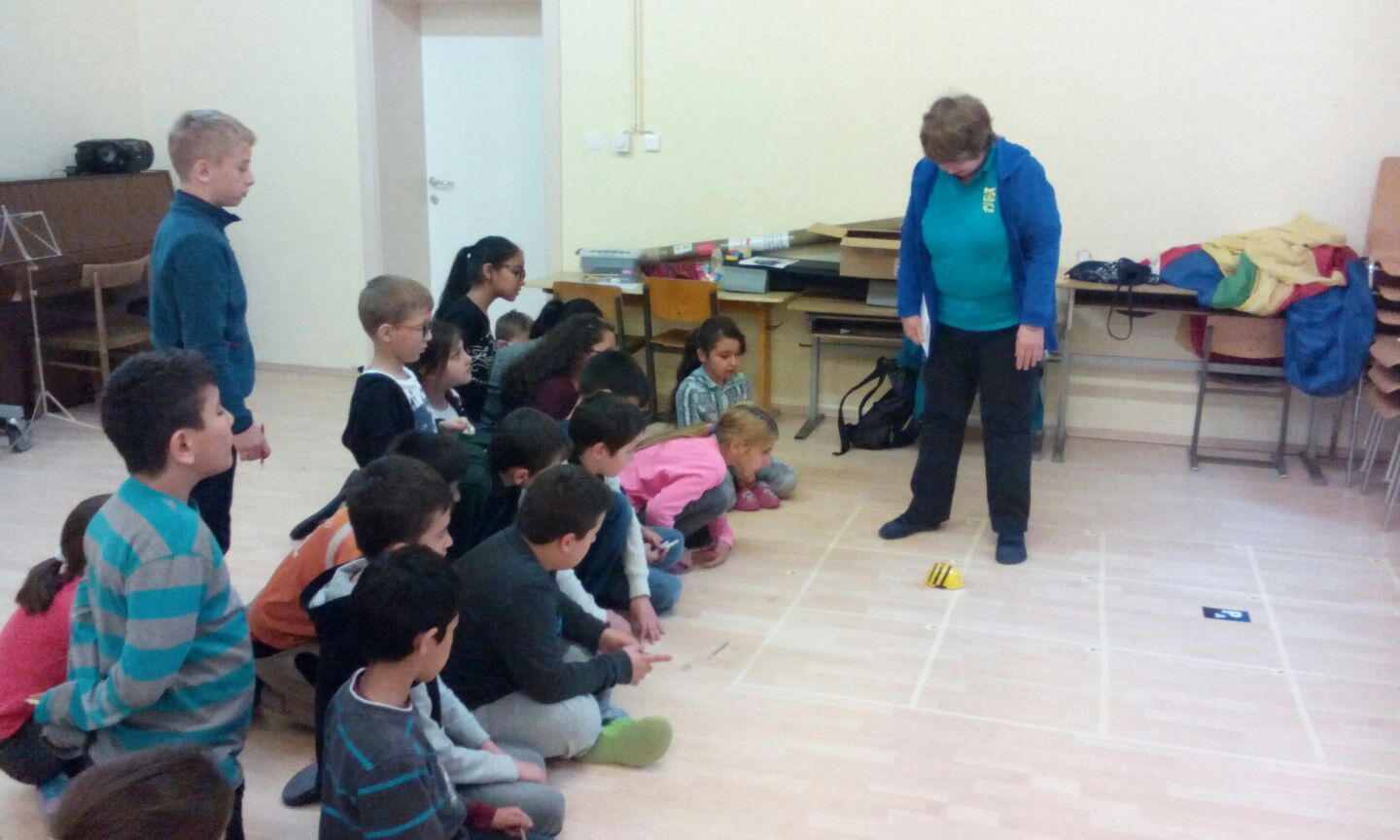
BeeBot in Daniel Gran II Schule April 5


  • 21 3rd graders
  • 3 stations (6 or 8 groups)
    •  Play robot one child programmed the other
    • BeeBot math 
      •  add 2 numbers like 3+5
        • 3 forward, pause, 5 forward, pause (on 8)
      • 2 digit numbers like 25
        • go to 2, pause, got to 5
    • BeeBot in traffic
  • end  class challenge
    • show path to number
    • showBeeBot buttons pressed to number
    • best 4 received a chocolate Easter lamb


Monday, May 18, 2015

Phyto-BioActive Food Pyramid app

Finally have prototype following article in William Carey Journal Fall 2014 (Oct) PHYTO-BIOACTIVE FOOD PYRAMID ©: A HEALTHY DIETARY PLAN FOR PREVENTING CERTAIN COMMON CANCERS  (references in comments)
and a Poster presentation at Texas A&M in Feb. 2014

Here is the current prototype.  In May of 2015 request go forward to demo and release an Android version in Play was requested. 


Thursday, July 25, 2013

July 2013 30 Minutes Robotics

What can you do in a 30 minute Robotics workshop with 6 children (ages 6-12)?
2 days x 4 workshops
Week's Theme: Space
2 Stations - 2 robots

Station 1: Space Travel: 
BeeBot on Solar System puzzle

Plan your path to the moon, planet, asteroids or star.

(First group put puzzle together and last one took apart)

Took turns in circle. When 2 workers broke group in half.
Task 1: Can you go from sun to a planet or moon? (usually just straight)
Task 2: Can you go to 2 places? (turn)

[some went back after NXT and light sensor]
Task 3: Go is a square [just to see if they could]
Task 4: Go in a circle when arrive at location


Station 2: "Solar" robot:
Lego NXT with Light Sensor using Mindstorms

1) What is a Light Sensor?
Demo the light sensor program that shows light readings.
Children read values:
a) room light 40-60 
b) dark (finger over sensor) 2-18
c) Handi flashlight 80-100

1b) Better having light sensor point forward or up?
Except first day all chose the sensor pointing up as best.
Some groups tried both before deciding.


2) Follow the light

If bright light, then drives forward. (like wisemen followed Christmas star)

Children took turns trying it out.


3) What should the robot do if no light?
[Motor ports]
Ideas the 8 groups tried:
* Come back to me
* Turn in a circle until see light again
  [but hard to direct out of the circle to somewhere]
* Turn slightly [Easier to direct]

Turn direction: What if reversed ports motors plugged into?


Additional station idea: 
Build a 5 minute Bot with parts pre-sorted.
Children would have liked to build a robot, but was alone first day.
Worked 2 years ago having 2-3 children work together to build a robot in 5-10 minutes.

Friday, July 19, 2013

July 2013 Dancing Robots

TechNike: Bühne frei: Roboter-Tanz [Stage free: Robot Dancing]

Length: 3 days
Program: Enchanting
Front-end: Scratch Puzzle Piece language
Back-end: Lejos (Java) on NXT
Emphasis on symmetry 

With Enchanting did more, faster like with Scratch.  This also meant restructuring lessons plans to include more fast.  


Of course in Austria the robots waltzed.

Featured on the TU Wien Informatik lab website.

Dances

  • Designed dance steps(alone): Create own block
  • Programmed familiar dances (together) like waltz and mirror partner robot
  • Class choreography dance:  Can we do the same thing at same time?
  • Repeated sequences of steps using very basics and reacting to sensors;
  • Basic symmetric movements: forward/backward; left/right
  • Basic forms: line, square, circle (turn in place, in big circle)
Sensors used: 
  • as signals to start or stop
  • to avoid a wall or robot, 
  • to advance to partner
  • to follow light and lines as guides.
Display and Sound
  • Screen animation to match movements
    • Could draw their own
  • Music notes as moved
  • Beginning and end sounds
Drawing Robot movements: enjoyed exploring
[could come earlier to teach design]
  • Figures
    • example was a star
    • A team tried to draw a heart, points were a probl
  • Draw Dance steps
    • A team used robot like spiral graph turning circles with slight changes each time

Wednesday, July 4, 2012

Summer'12: Waterbotics, TX & Girls Robotics Austria

This summer it was all girls camps:
Water Robot using gears
Texas 
Wallip Waterbotics 2012 
Camp in June on TSU campus in Houston, TX .  
A 5 day program with goals to reach every day


techNIKE-Workshops at the Vienna Univ. of Tech. in July

Land Mobile Robot  using sensors
-  1 day program repeated daily with 1 day for advanced girls

Analysis and Comparison

Generally found less is sometimes more. I liked how Austrians repeated similar tasks for each sensor, so they were able to explore better.

Texas Waterbotics vs TechNike Robotics Day
  • Water vs Land
  • Both planned for 1 age group used for broader age range 
    • 15-18 used with 12-15 vs. 10-13 used with 10-45
  • 1 Week vs 1 Day repeated
  • Specific tasks vs. Intro tasks, then explore
  • Construction: example, but own model vs. 1 model given 
  • Construction modifications on own vs. modifications given
  • Both group of campers wanted more construction examples
  • 1 trainer sometimes 2 trainers vs. 3 trainers always
  • Trained in January vs trained week before
  • New program with new feature each task vs. new sensor similar program
  • Both: encouragement to try science and engineering
  • teams and learned team work matters vs. pairs or individual
  • Campers paces: worked at very different paces vs.  worked at similar paces.
  • Computers set-up day before camp vs. computers set-up earlier with VM
  • Both at Univ but: No connection vs campers saw a demo of a high school swarm research project in progress 
  • Backgrounds: Same ethnicity, but different economic vs mainly Austrian, but many internationals
  • Both: 1 or more sets of twins

What would change

Can definitely learn from both!
Both: Add good construction basic finger exercises

Texas Waterbotics 2012 :  
More self-paced with online-instructions to handle different paces. Especially since had problems with smart board. Possibly a VM computer set-up. 

Austrian Girls Robotics Day
Have the girls show and explain their own project at some time during the day.


Saturday, July 30, 2011

July 2011 English / German day camp in Vienna (+robotics workshop)

Austrians children need to learn English. International children need to learn German so.... CEF English/German day camp  (theme Detectives) in Vienna July 18-22
Campers were in  12 groups of 10, mixed native English and German speakers with two leaders, one native German speaker and one native English speaker of which I was one. Two afternoons the campers could chose  from various workshops
  • Day 1: 2x 1 hour
  • Day 2: 4x 30 minutes (some stayed longer or came back)
    (Lego) Robotics Workshop: 
    4 Stations
    Started with an overview via demo and then group went to different stations.
    • Enchanting  for a simple intruder alarm
      • ultrasound sensor - is someone is there?
      • light sensor - light or dark object
      • sound sensor - Is something is there and making a noise? If campers made noise, set off alarm.
      • Object moved behind a sheet and campers said if it was light or dark and how far away it was.
      • [Evaluation: Enchanting    
        • [Update: 30min.to 1 hour was short, but in Spring 2012 in France a 3 hour workshop using Enchanting worked well. Also Enchanting tool has matured in the last year.]
        • is a promising Scratch/ BYOB like interface to Lego NXT.
        • worked for workshop demos.
        • caught the campers interest. Some came multiple times.
        • Version 0.0.8 is not a mature enough for beginners to program with quickly
          • A camper (age 10) did successfully program with Enchanting, but having used NXT-G before he volunteered he preferred that.
          • With NXT-G campers might have programmed a sensor. 
          • was 2nd real/trial use of Enchanting with children anywhere.]
          • Update April 2012: newer (now byob based) Enchanting 0.0.9.1 has been used by winning elementary /middle school teams in contests on multiple continents.
    • Construct a 5 minute bot and use to detect an intruder
      • used their robot with either with Mindroid or the Enchanting program.
      • 3 campers constructed a tank-tread robot in 10 minutes without construction plans nor any previous NXT experience!
      • [Evaluation: Really took only 5-15 minutes for beginners.]
    • Mindroid:
      • Tilt sensor in Android phone to drive Lego robot
      • Challenge drive around a trash basket.
      • [Evaluation: worked well,  shortest station - 5 minutes]
    • BeeBot 
      • Logo like- 7 buttons: 
        • forward, backwards, left, right, go, pause, clear
      • Clear 5x5 square grid. 1 grid is how far it travels in forward 1
      • various challenges:
        • go to chosen square
        • Numbers: go to digits
        • Letters: spell word by going to letters
      • [Evaluation: 
        • Campers and my helper loved it. 
        • Spelling Bee-Bot was an attraction when it rained.]
       

    Monday, July 25, 2011

    June 2011 Scratch Techie Camp

    Before
    It came together very fast, but it worked out well.
    Wed. Asked if I could teach the next week 
    Sat. fly  in + continue to learn Scratch+ final orientation
    Mon-Fri Teach Scratch Techie Camp (Tech Corps Texas)


    Camp Week
    Camp consisted of inner city (8-12) kids (ages 8-13), some encouraged by their parents wanting something better and some there because of the free lunch. The kids reaction to Scratch sold me. Some were obviously at the top of their class and others obviously not, but none had problems using Scratch. Give them an inch and they created a mile. We joked they never did what they were told. They expanded all exercises and Scratch cards into something more, without help. Something that was theirs, never exactly like what they were told to do.


    By the end of the first day they used features to create short animated stories with effects and expanded on this the second day. The third day was a game using broadcast / receive. However due an all day storm Wed. some were missing and electricity went off at least 7 times. So the fourth day was mixture of catching some up and helping them chose project ideas.  


    The projects were mostly dress up games or stories. One made the shark scratch card in to a game with more fish and scoring.  The Dress up games varied...Some dressed themselves up on stage, others included a baby and other characters with themselves in a room.  Some had closet of clothes click on your dress of choice approach, and some changed colors of the clothes via a buttons. (no pictures since the children appear also in the stories)


    After Camp
    The day after camp, some kids were back in lab continuing on their projects. 
    Scratch spurred me on to explore. Besides exploring the best ways to use Scratch, I found other puzzle GUI tools: Enchanting, BYOB, Android App Inventor. The following mind map shows I came full circle to my robotic related tools / projects.


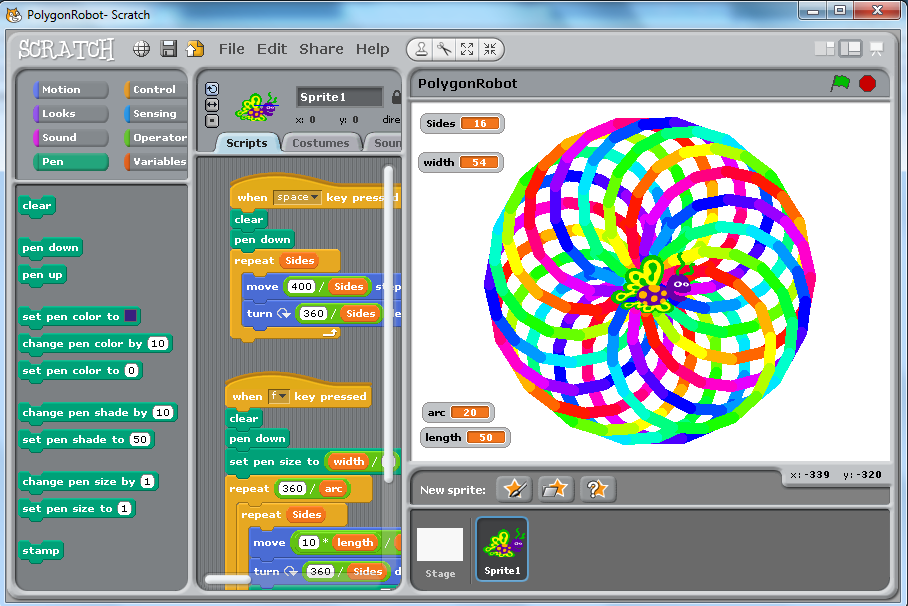
    modified and optimized polygon robot
    Notes:
    Modified/optimized (left) and polygon robot (original) 


    Listening to Scratch 2011 Education Webinars helped me find references to explain project based learning uses the Constructivism learning theory and how it works with Scratch.

      Curious 
    • Language levels vs. pallets/blocks - do they fit together?
    • Could BYOB be seen as the advanced language version of Scratch?
    • Alice, 3D story-telling vs. Scratch 2D story telling.

    Wednesday, December 15, 2010

    Robotics

    Enjoying learning more and more about robotics in general via a variety of robots used in education
    • Lego Mindstorms (LMS) 
      • Training: Dec.08-Jan09 Education class at Vienna University of Technology (TU Wien)
      • NXT-G 
        • the graphic language from Lego and National Instruments
      • Lejos  
        • Java on LMS
      • LMS forte  
        • helping develop HW Function Blocks and will develop online tutorial classes
    • KIPR KISS Botball
      • Training: Introduction seminar by Dr. D. Miller (OU)  at (TU Wien)
      • Racket on Botball (side project in progress)
    • BeeBots
      • K-5 via K.North at Piney Point Elem. Houston, TX
      • Like Turtle graphics, but also good for spelling bees
    • Parallax Robots
      • Since RIE2010 on wishlist to learn
        • good to learn basic electronics
        • excellent on-line documentation
        • have a parallel processor

    Saturday, September 18, 2010

    Sept. 2010 RIE 2010 Article

    Utilizing Lego Mindstorms as a Teaching Platform for Industrial Automation 
    (C.Oates, A.Zoitl)

    • Presented at Robots in Education 2010 in Bratislava
    • Also chosen for the journal AT&P Plus 2/2010 with selected papers from the conference
    Presentation
    Demo Videos


    RIE 2010 itself
    • Conferences are for networking.
    • Robots from small Parallax Robots to teach electronics to the large ABB Robot arm were presented.
    • Besides experiences teaching, students presented self-made robots, robot arms / cranes to ant like robots. The last day there was contest to see how outdoor robots performed outdoor tasks and travel.

    Friday, September 10, 2010

    Video Summary

    Better videos have been uploaded to YouTube here.

    Balancing Segway (NXT-G) with color sensor

    • Example of PID controller with Lego Mindstorms (LMS)
      • Used with Elementary school students
    First demos of Lego Mindstorms with IEC61499 and 4DIAC/forte

    Balancing Segway (NXT-G) with color sensor

    • Example of PID controller with Lego Mindstorms (LMS)
      • Used with Elementary school students
    Videos used in an e-Bible course used in Austrian prison e-course system Telefi

    Lego Sock Sorter

    • my first Lego project (team of 3)


    Sunday, November 1, 2009

    Nov. 2009 Hurricane Math

    Hurricane Math is final project from Technology in Math. It explores curiosity questions I had after watching Hurricane Katrina, waiting for Hurricane Rita, and watching Ike live via Internet from Austria. 


    It is a collection of assignments to be used as a resource when hurricanes are in the news.
    It is meant to go beyond typical assignment of- Plot the hurricane track to evaluate the hurricane track. (pre-calculus or calculus)
    It main assignment asks the question: 
    Are there really more hurricanes now than previously? via statistics.What statistical model do hurricanes fit.
    It also looks at How good was the hurricane response given how hard hurricanes are to predict.
    And the form of the hurricane spiral. There are additional smaller assignments, whose main purpose is to get students to ask their own curiosity questions.


    It requires a spreadsheet tool such as MS Excel or Open Office Calc.
    Its main assignment is appropriate for a statistics class, but has other exercises exploring hurricanes mathematically. 


    Excerpt from Original email when turned assignment:
    It is a collection of exercises.
    Start with: HurricaneMath0GoalsOverview.pdf

    It was developed with Open Office Calc (Linux), but was briefly tested with Excel (Windows).
    Please let me know you have received this.

    Most useful new trick I learned this semester was: Putting a graph on top of a picture.